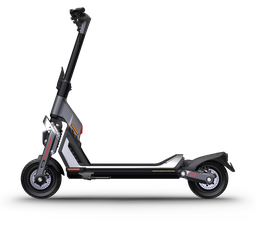
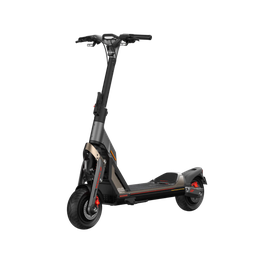
PWN автоматически распознаёт совместимый G3 BLE/TFT, включая ветки 0.3.x и 0.4.x, и адаптирует названия режимов, индикацию AUTO-света, TCS/2WD и отображение мощности.
PWN automatically detects a compatible G3 BLE/TFT, including the 0.3.x and 0.4.x branches, and adapts mode names, AUTO light indication, TCS/2WD, and power display.
Скрытие настроек после привязкиSettings hidden after binding
GoogleApple
Самокат с поддерживаемой прошивкой можно привязать к текущему PWN-аккаунту Google или Apple. После привязки раздел PWN-настроек виден только при входе в тот же аккаунт; без входа или под другим аккаунтом он скрыт. Это не блокировка езды или самого самоката.
A scooter with supported firmware can be bound to the current Google or Apple PWN account. After binding, the PWN settings section is only visible when signed in to the same account; it is hidden when signed out or using another account. This does not lock riding or the scooter itself.
Самокат не переходит в режим зарядки, не показывает зарядный экран и не блокирует поездку из-за зарядного тока или статуса BMS, даже если зарядник подключён. Остальные ограничения движения сохраняются.
The scooter does not enter charging mode, show the charging screen, or block the ride because of charging current or a BMS charging status, even with a charger connected. Other ride restrictions remain.
В PWN запас Boost не расходуется: после включения шкала остаётся на 100%, а ускорение работает до повторного нажатия кнопки, выхода из Race, парковки, снижения заряда ниже 30% или достижения температурного лимита.
In PWN, the Boost pool does not drain: after activation, the gauge stays at 100%, and acceleration remains active until the button is pressed again, Race mode is exited, parking starts, charge drops below 30%, or a temperature limit is reached.
GT3PRACEBoost 100%Защиты активныSafety limits active
Снимает штатное программное ограничение максимальной скорости. Фактическая скорость зависит от модели, заряда батареи, нагрузки, температуры и настроек токов; аппаратные и температурные защиты продолжают работать.
Removes the stock software maximum-speed cap. Actual speed depends on the model, battery charge, load, temperature, and current settings; hardware and thermal protections remain active.
PWNБез штатного лимитаStock cap removedЗащиты активныSafety limits active
Чувствительность блокировки после выключенияWheel lock sensitivity when off
Определяет, насколько сильное движение выключенного самоката включает удержание колеса. Доступны низкая, средняя, высокая и максимальная чувствительность. Работает при включённой блокировке.
Controls how much movement of the switched-off scooter engages wheel hold. Low, medium, high, and maximum sensitivity are available. The lock must be enabled.
Отключает чтение и показ ошибок и предупреждений. Защиты продолжают работать: тяга может ограничиваться, а самокат — выключаться без уведомления.
Stops reading and displaying errors and warnings. Protections remain active, so power may be limited or the scooter may shut down without a notification.
На GT3P прошивка отслеживает угловое движение самоката, распознаёт завершение манёвра и автоматически выключает левый или правый поворотник. Аварийная сигнализация не отключается этой функцией.
On GT3P, the firmware tracks the scooter’s angular movement, detects when a manoeuvre has ended, and automatically switches off the left or right turn signal. Hazard lights are not affected by this feature.
На остановленном самокате удерживайте кнопку включения около 20 секунд. Длинный сигнал подтверждает перезапуск, после него VCU перезапускается. Если отпустить кнопку до сигнала или самокат поедет, отсчёт начинается заново. Прошивка и сохранённые настройки не стираются.
With the scooter stopped, hold POWER for about 20 seconds. A long beep confirms the restart, and then the VCU restarts. Releasing the button before the beep or moving the scooter starts the count again. Firmware and saved settings are not erased.
Возврат к стоковой прошивке в любое времяReturn to stock firmware at any time
PWNSTOCKFactory Reset↻
После установки PWN можно в любой момент выбрать Factory Reset в каталоге PWN BOT и вернуть штатную VCU-прошивку. Прошивку выполняйте на неподвижном самокате при стабильном питании и BLE-соединении.
After installing PWN, you can select Factory Reset in the PWN BOT catalog at any time to restore the stock VCU firmware. Flash only while the scooter is stationary with stable power and BLE connectivity.
Яркость TFT, фиксированные левый и правый виджеты и состав цикла справа.TFT brightness, the fixed left and right widgets, and the metrics in the right-side cycle.
Выбирает постоянную карточку слева: поездка, ODO, температуры мотора, BMS и FET, ток, мощность, средняя скорость, время поездки, максимальная температура, напряжение АКБ или запас хода. По умолчанию показан запас хода.
Chooses the card that stays on the left: trip, ODO, motor, BMS and FET temperatures, current, power, average speed, trip time, maximum temperature, battery voltage, or remaining range. Remaining range is the default.
Отдельно выбирает карточку справа. Доступны те же 12 вариантов, включая напряжение АКБ и запас хода. Цикл ниже решает, какие показатели листаются кнопками.
Separately chooses the card on the right. The same 12 options are available, including battery voltage and remaining range. The cycle below decides which readings the buttons step through.
Выбирает показатели, которые участвуют в переключении правого виджета кнопками: поездка, ODO, температуры мотора/BMS/FET, ток, мощность, средняя скорость, время поездки и максимальная температура. Хотя бы один вариант должен остаться включённым.
Chooses the metrics cycled by the right-widget buttons: trip, ODO, motor/BMS/FET temperature, current, power, average speed, trip time, and maximum temperature. At least one metric must remain enabled.
Экран Boost, уведомления с телефона, графики, данные батареи, игра, управление музыкой и навигация из приложения. Нужны согласованные прошивки VCU и дисплея PWN.Boost screen, phone notifications, charts, battery data, a game, music controls, and navigation from the app. Matching PWN firmware on the VCU and the display is required.
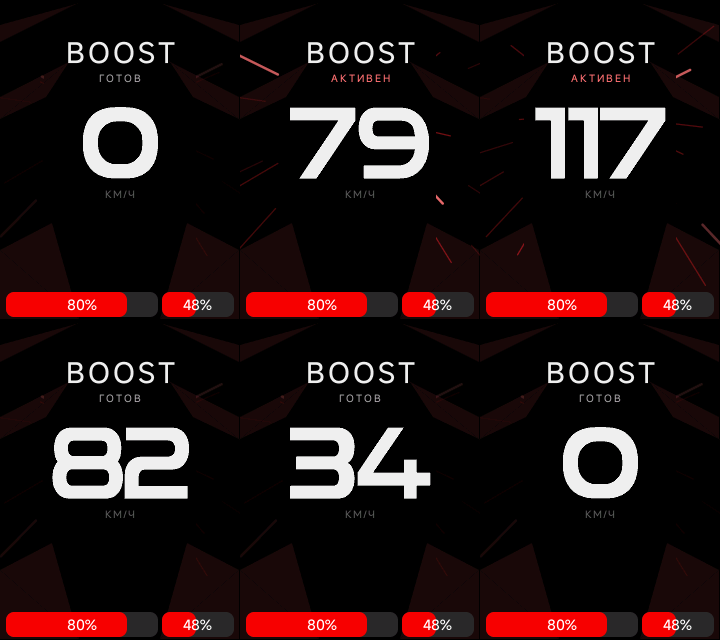
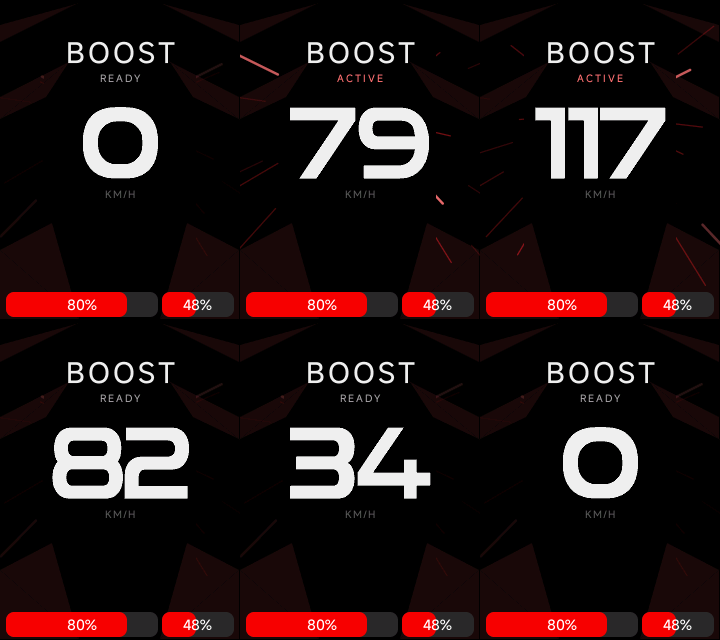
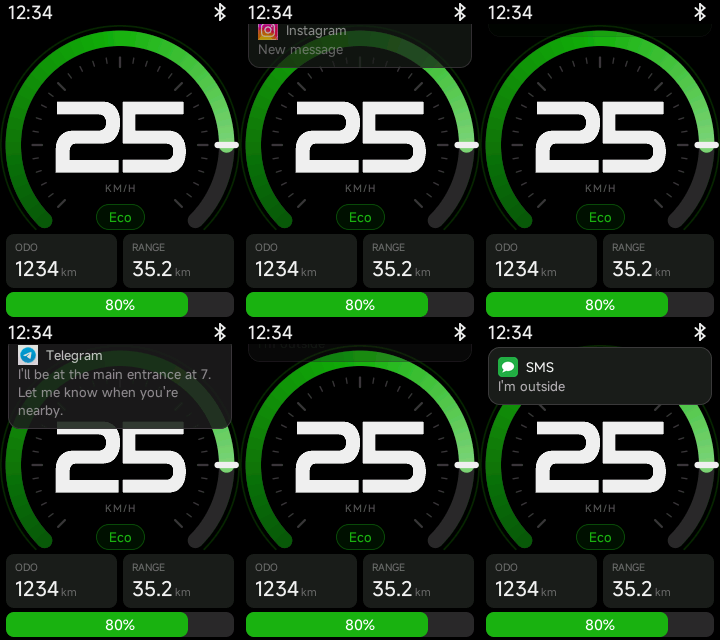
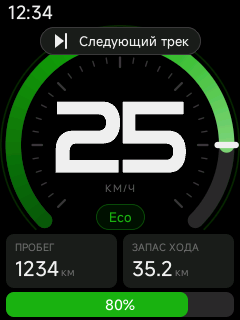
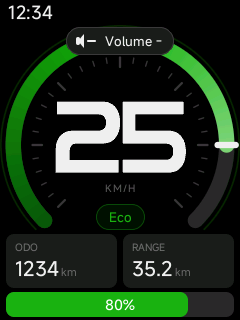
Полноэкранный спидометр PWN показывает скорость, заряд батарей и состояние Boost. Когда Boost активен, по краям экрана расходятся анимированные штрихи.
The full-screen PWN speedometer shows speed, battery charge, and Boost status. When Boost is active, animated streaks fan out along the sides of the screen.
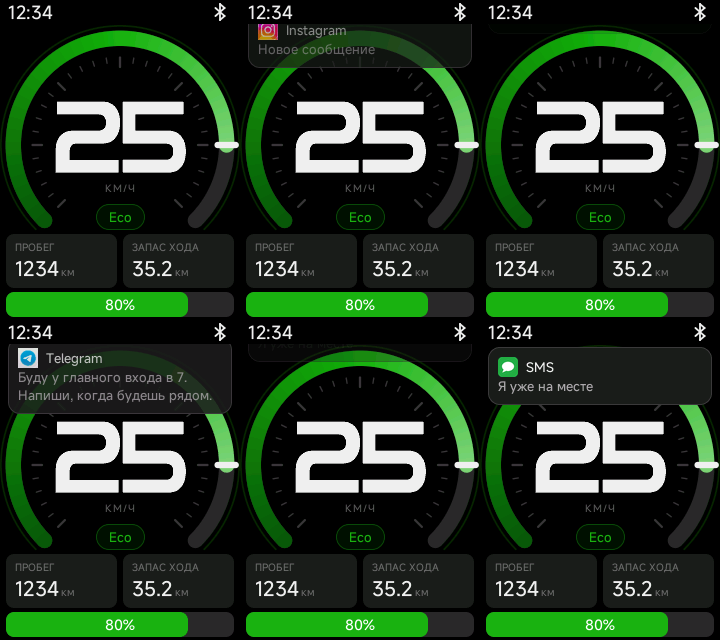
Уведомления с подключённого iPhone или Android появляются на главном экране самоката и в навигации. Карточка показывает заголовок, текст и значок приложения, если он доступен. Для показа уведомлений нужно разрешение на телефоне.
Notifications from a connected iPhone or Android phone appear on the scooter’s home and navigation screens. Each card shows the title, message, and app icon when available. Notification access must be enabled on the phone.
В настройках кнопок назначьте действие «Открыть/закрыть графики».In the button settings, assign the “Open/close charts” action.
Нажмите эту кнопку, чтобы открыть графики на дисплее.Press that button to open the charts on the display.
Левый тормоз листает назад, правый — вперёд. Если нажаты оба, страница не меняется.The left brake goes back and the right brake goes forward. Pressing both does not change the page.
Закройте раздел той же кнопкой. Он также закрывается при выходе из поездки и при начале зарядки.Close the section with the same button. Leaving a ride or starting a charge closes it too.
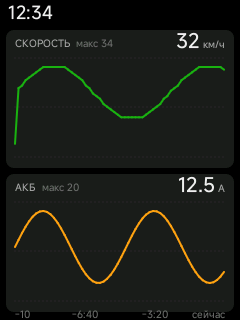
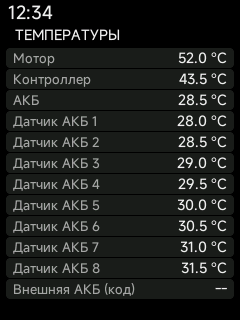
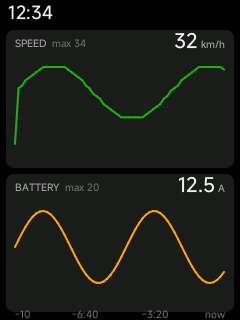
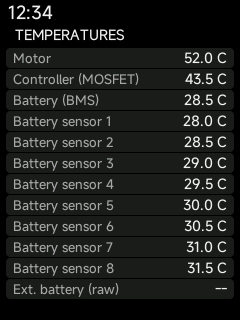
Первая страница показывает скорость и ток основной батареи за последние 10 минут. Следующая — текущие температуры мотора, контроллера, батареи и её датчиков. История хранится в памяти дисплея и пропадает после его перезапуска.
The first page shows speed and main-battery current for the last 10 minutes. The next page shows the current temperatures of the motor, controller, battery, and its sensors. The history stays in the display memory and is lost when the display restarts.
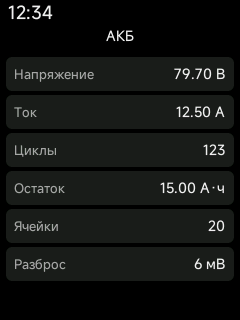
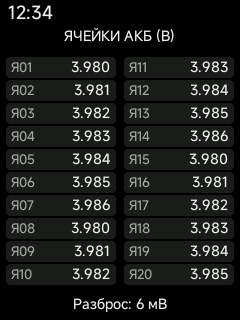
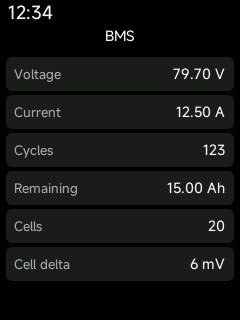
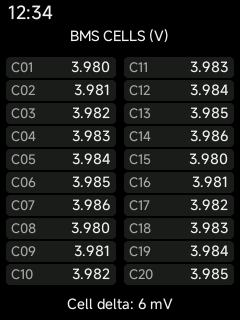
В том же разделе есть страница основной батареи: напряжение, ток, число циклов, остаточная ёмкость, количество ячеек и разница между самой высокой и самой низкой. Отдельная страница показывает напряжение каждой ячейки. Внешняя батарея сюда не входит. Пока показание не получено, на его месте стоит прочерк.
The same section includes a main-battery page: voltage, current, cycle count, remaining capacity, cell count, and the spread between the highest and lowest cells. A separate page shows each cell voltage. The external battery is not included. Until a reading arrives, its place shows a dash.
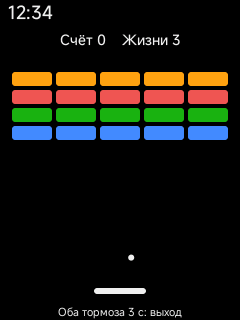
В разделе графиков есть арканоид. Играть можно только на месте. Сначала отпустите оба тормоза, затем удерживайте их около трёх секунд: шарик стартует после отпускания. В игре один тормоз двигает платформу, оба сразу ставят паузу. Если самокат поедет, игра закрывается и снова открываются графики.
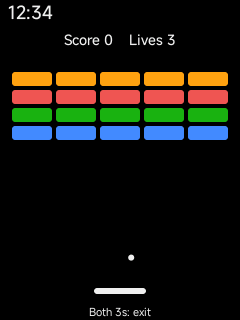
The charts section includes Arkanoid. It can be played only while stopped. Release both brakes, then hold them for about three seconds: the ball starts when they are released. During the game one brake moves the paddle, and both brakes pause it. If the scooter starts moving, the game closes and the charts return.
В верхней строке экрана должна остаться только эта иконка Bluetooth с нотой. Обычный значок Bluetooth или подключение приложения не подходят.Only this Bluetooth icon with a note should remain in the top bar. A plain Bluetooth icon or the app connection does not count.
Назначьте команды музыки на кнопки.Assign the music commands to the buttons.
Если переключение не работает, выключите AirLock, удалите сопряжение с Bluetooth-устройством самоката в настройках телефона и пройдите настройку AirLock ещё раз.If the controls do not work, turn AirLock off, delete the scooter’s Bluetooth pairing in the phone settings, and set up AirLock again.
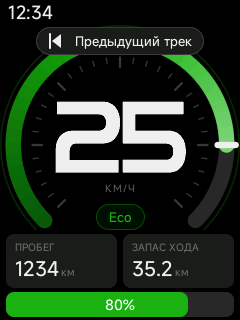
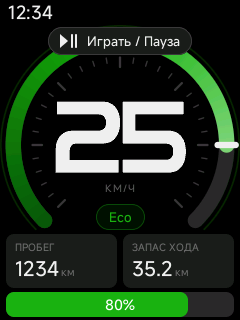
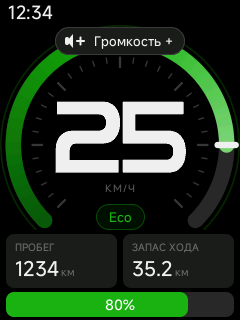
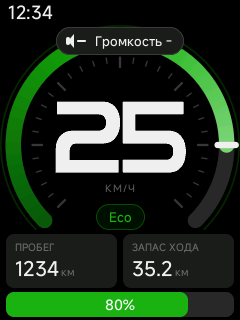
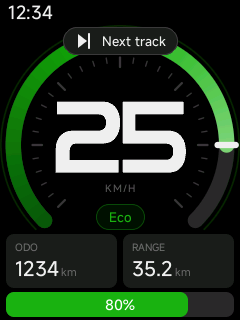
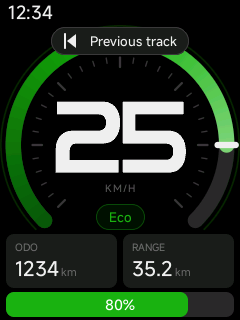
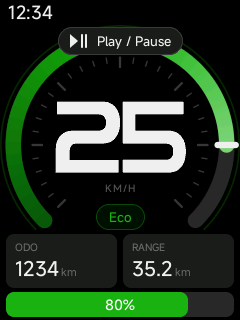
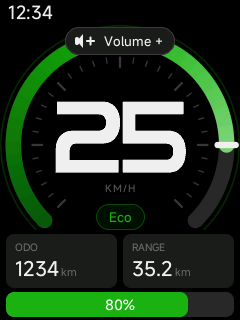
На кнопки можно назначить следующий трек, предыдущий трек, играть или паузу, а также громче и тише. На экране коротко подтверждается отправка команды. Как её выполнит плеер, решает телефон.
Buttons can be assigned next track, previous track, play or pause, and volume up or down. The screen briefly confirms that the command was sent. The phone decides how the player carries it out.
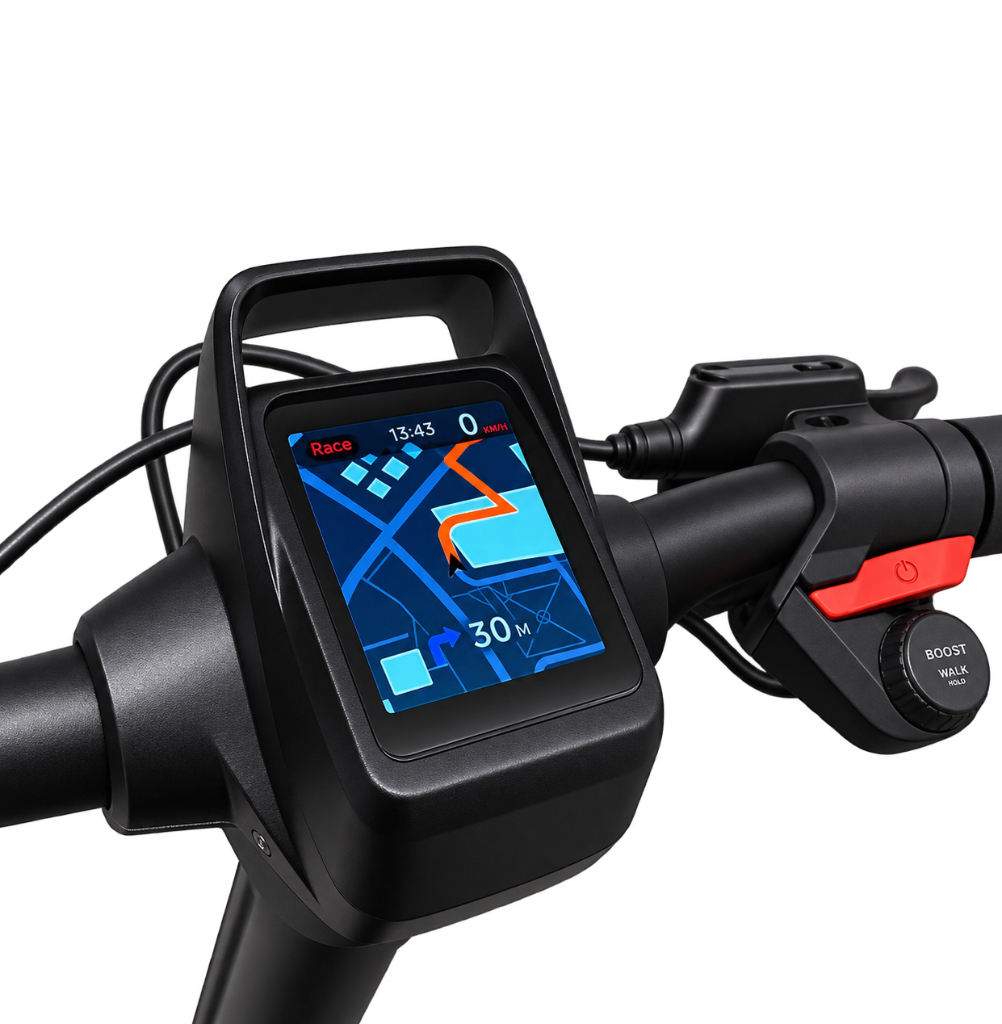
Приложение PWN BOT строит пешеходный маршрут в Google Картах или Яндекс Картах и транслирует карту на экран самоката в реальном времени. Сверху остаются скорость и режим. На экране видны следующий поворот и расстояние до него. Пока телефон передаёт картинку, она занимает дисплей. Без картинки остаются направление, расстояние и время до цели.
The PWN BOT app builds a walking route in Google Maps or Yandex Maps and streams the map to the scooter screen in real time. Speed and ride mode stay at the top. The screen shows the next turn and the distance to it. While the phone sends the picture, it fills the display. Without the picture, the direction, distance, and time to the destination remain.
Google / ЯндексПешкомWalkingРеальное времяReal time
Ослабление поля, прямой газ, кривая ручки и торможение по скорости. Нужны совместимые PWN VCU и PWN MCU.Field weakening, direct throttle, the throttle curve, and speed-based braking. Compatible PWN VCU and PWN MCU firmware is required.
FW включается отдельно для Walk, Eco, Sport, Race и Boost. Пока Boost активен, действует только его переключатель. Ток и скорость включения общие. По умолчанию включён только Boost.
FW is enabled separately for Walk, Eco, Sport, Race, and Boost. While Boost is active, only its switch applies. Current and activation speed are shared. Only Boost is enabled by default.
Прямое управление током включается отдельно для Walk, Eco, Sport, Race и Boost. При активном Boost действует только его переключатель. Выключено — штатное управление скоростью, включено — ток по общей кривой газа. Во время Boost TCS выключен независимо от этой настройки. По умолчанию прямой газ выключен во всех режимах.
Direct current control is enabled separately for Walk, Eco, Sport, Race, and Boost. While Boost is active, only its switch applies. Off keeps stock speed control, and on follows the shared throttle curve. TCS stays off during Boost regardless of this setting. Direct throttle is off in every mode by default.
Одна кривая для всех режимов, независимо от прямого газа. Крайние точки 0% и 100% закреплены, три промежуточные можно сдвигать без спада кривой. Шаблоны «Линейный» и «Квадратичный» подставляют промежуточные точки, после этого их снова можно править.
One curve for every mode, whether or not direct throttle is on. The 0% and 100% ends stay fixed, and the three points between them can be moved without letting the curve fall. The Linear and Quadratic presets fill those points, which can then be edited again.
0 / 25 / 50 / 75 / 100%Линейный по умолчаниюLinear by default
График задаёт фазный ток каждого мотора по скорости его колеса, от 0 до 250 А. На нулевой скорости ток нулевой. Накат и противоугонное торможение не меняются. Меняйте график на остановленном самокате с отпущенными газом и тормозом.
The curve sets each motor’s phase current against its wheel speed, from 0 to 250 A. Current is zero at zero speed. Coasting and anti-theft braking stay unchanged. Change the curve only while stopped, with the throttle and brakes released.
Батарейный ток рекуперацииRegenerative battery current
DCkm/h
График задаёт общий ток заряда батареи от обоих моторов, от 0 до 63 А, по скорости более быстрого колеса. Ноль отключает рекуперацию. Напряжение, температура и защиты могут снизить фактический ток.
The curve sets the combined battery charging current from both motors, from 0 to 63 A, using the faster wheel’s speed. Zero disables regeneration. Voltage, temperature, and protections can reduce the actual current.
Iq ограничивает моторный ток и влияет на тягу. DC ограничивает ток от батареи. Значение 0 возвращает штатный лимит; защиты MCU остаются активными.Iq limits motor current and affects torque. DC limits current drawn from the battery. A value of 0 restores the stock limit; MCU protections remain active.
Фазный ток тяги каждого мотора, пока Boost активен. Ноль оставляет ток выбранного режима. После выхода из Boost возвращается ток режима. Запрос задаёт VCU, фактический ток ограничен защитами MCU.
Drive phase current for each motor while Boost is active. Zero keeps the selected mode’s current. Leaving Boost restores the mode current. The VCU sets the request, and MCU protections limit the actual current.
Общий батарейный ток двух моторов во время Boost. Ноль оставляет значение выбранного режима. Программный предел по BMS не применяется. Защиты MCU сохраняют общий предел 140 А.
The combined battery current of both motors during Boost. Zero keeps the selected mode’s value. The BMS software current limit is not applied. MCU protections keep the combined 140 A limit.
Для каждой кнопки отдельно задаются нажатие, удержание и двойной клик. У POWER нет удержания. «Не выбрано» отключает жест. Если назначен двойной клик, одиночное нажатие ждёт второе 300 мс. Сработавшее удержание отменяет нажатие. Стробоскоп и гудок есть только на удержании и прекращаются при отпускании. Сочетания с тормозом важнее отдельных Boost и Cruise.Each button has its own click, hold, and double click. POWER has no hold assignment. “Not selected” disables that gesture. When a double click is assigned, a single click waits 300 ms for the second one. A completed hold cancels the click. Strobe and horn are hold-only and stop on release. Brake combinations take priority over Boost and Cruise alone.
Не выбраноNot selected
Аварийная сигнализацияHazard lights
Стробоскоп дальним светомHigh-beam strobe
ГудокHorn
Emergency: вкл. / выкл. / переключитьEmergency: on / off / toggle
Нажатие, удержание и двойной кликClick, hold, and double click
1HOLD2
Жесты задаются отдельно. У POWER настраиваются нажатие и двойной клик. У Mode +, Mode −, Light +, Light −, обоих поворотников, Boost, Cruise и гудка — все три жеста.
The gestures are assigned separately. POWER has a click and a double click. Mode +, Mode −, Light +, Light −, both turn signals, Boost, Cruise, and the horn have all three gestures.
Нажатие, удержание и двойной клик гудка настраиваются отдельно. Если на нажатие или двойной клик назначено действие, сам гудок ждёт общую задержку удержания. Иначе он звучит сразу.
The horn has its own click, hold, and double click. If a click or double click has an action, the horn itself waits for the shared hold delay. Otherwise it sounds immediately.
Скрытие настроек после привязкиSettings hidden after binding
GoogleApple
Самокат с поддерживаемой прошивкой можно привязать к текущему PWN-аккаунту Google или Apple. После привязки раздел PWN-настроек виден только при входе в тот же аккаунт; без входа или под другим аккаунтом он скрыт. Это не блокировка езды или самого самоката.
A scooter with supported firmware can be bound to the current Google or Apple PWN account. After binding, the PWN settings section is only visible when signed in to the same account; it is hidden when signed out or using another account. This does not lock riding or the scooter itself.
Возврат к стоковой прошивке в любое времяReturn to stock firmware at any time
PWNSTOCKFactory Reset↻
После установки PWN можно в любой момент выбрать Factory Reset в каталоге PWN BOT и вернуть штатную VCU-прошивку G3. Прошивку выполняйте на неподвижном самокате при стабильном питании и BLE-соединении.
After installing PWN, you can select Factory Reset in the PWN BOT catalog at any time to restore the stock G3 VCU firmware. Flash only while the scooter is stationary with stable power and BLE connectivity.
Аварийный режим, Boost, потолок скорости, таймер поворотника и хардварный перезапуск VCU.Emergency mode, Boost, the speed cap, the turn-signal timer, and the VCU hardware restart.
Включает аварийный режим после запуска. Кнопка может отдельно включить, выключить или переключить его на текущую поездку. Пока режим активен, Boost выключен, TCS включён принудительно, подсветка днища погашена, а FW не работает. Передний габарит на это время задаётся отдельно. После выхода прежние состояния возвращаются.
Turns emergency mode on at startup. A button can turn it on, off, or toggle it for the current ride. While it is active, Boost is off, TCS is forced on, the underglow is off, and FW does not run. The front position light for this time is chosen separately. Previous states return when the mode ends.
Передний габарит в EmergencyFront position light in Emergency
EMERGENCY
Задаёт, горит ли передний габарит, пока Emergency включён. После выхода возвращается обычная настройка габарита. По умолчанию выключен.
Chooses whether the front position light stays on while Emergency is active. Leaving Emergency restores the normal position-light setting. Off by default.
Запас Boost не расходуется: после включения шкала остаётся на 100%. Ускорение работает до повторного нажатия, включения аварийного режима или выхода из поездки в парковку, ожидание или выключение. В аварийном режиме Boost не включается.
The Boost pool does not drain: after activation, the gauge stays at 100%. Acceleration remains until the button is pressed again, emergency mode is turned on, or the scooter leaves the ride for parking, standby, or power-off. Boost cannot be turned on during emergency mode.
Для ECO, DRIVE и SPORT общий потолок скорости поднят до 100 км/ч. Если ток батареи режима не равен нулю, предел скорости этого режима берётся из него. Фактическая скорость зависит от батареи, нагрузки и температуры. В аварийном режиме действует отдельный предел. Аппаратные и температурные защиты продолжают работать.
For ECO, DRIVE, and SPORT, the shared speed cap is raised to 100 km/h. If that mode’s battery current is not zero, the mode speed limit is taken from it. Actual speed depends on the battery, load, and temperature. Emergency mode uses its own limit. Hardware and thermal protections remain active.
100 km/hECO / DRIVE / SPORTЗащиты активныSafety limits active
Если в обычных настройках света включено автовыключение поворотника, левый или правый указатель гаснет, когда самокат выпрямляется после поворота. Если поворот так и не начался, указатель гаснет через 10 секунд. Аварийная сигнализация этим не выключается.
When turn-signal auto-off is enabled in the regular light settings, the left or right signal turns off once the scooter straightens after the turn. If the turn never starts, the signal turns off after 10 seconds. Hazard lights are not turned off by this.
На остановленном самокате удерживайте кнопку включения около 20 секунд. Длинный сигнал подтверждает перезапуск, после него VCU перезапускается. Если отпустить кнопку до сигнала или самокат поедет, отсчёт начинается заново. Прошивка и сохранённые настройки не стираются.
With the scooter stopped, hold POWER for about 20 seconds. A long beep confirms the restart, and then the VCU restarts. Releasing the button before the beep or moving the scooter starts the count again. Firmware and saved settings are not erased.
После поездки запоминает выбранный режим фары: выключено, включено или AUTO. При следующем включении этот режим восстанавливается. Выключение без поездки сохранённый режим не меняет.
After a ride, PWN remembers the selected headlight mode: off, on, or AUTO. That mode is restored the next time the scooter is turned on. Powering off without a ride does not replace the saved mode.
Фара мигает, пока удерживается штатная кнопка звука G3 или пока звучит гудок мотором, назначенный на удержание. Одиночный звук кнопки стробоскоп не включает. Частота берётся из настройки мигания фары.
The headlight flashes while the native G3 sound button is held, or while a motor honk assigned to a hold is sounding. A one-shot button sound does not start the strobe. The rate comes from the headlight flashing setting.
Звук при мигании AirLockAirLock approach flash sound
‹›
В начале каждого мигания при приближении телефона один раз звучит сигнал. Работает вместе с настройкой «Поворотники при приближении». По умолчанию выключено.
A sound plays once at the start of each flash when the phone approaches. It works together with the approach turn-signal setting. Off by default.
Прямой газ, ослабление поля, отклик на газ, торможение мотором и возврат энергии не применяются в аварийном режиме.Direct throttle, field weakening, throttle response, motor braking, and energy recovery are not applied in emergency mode.
Отдельно включает прямой газ в ECO, DRIVE и SPORT. В выбранном режиме газ сразу задаёт ток, без дополнительного сглаживания команды. В аварийном режиме, вне поездки, при зарядке и во время обновления прямой газ выключен.
Turns direct throttle on separately for ECO, DRIVE, and SPORT. In a selected mode, throttle requests current immediately, without extra smoothing of the command. Direct throttle is off in emergency mode, outside a ride, while charging, and during an update.
ECO / DRIVE / SPORTПо умолчанию выкл.Off by default
Общий выбор для режимов, где включён DPC. Линейный: половина газа задаёт половину доступного тока. Квадратичный: в начале хода газ мягче, полный газ даёт тот же максимум. Дополнительной задержки нет. По умолчанию выбран линейный.
One choice for every mode with DPC enabled. Linear: half throttle requests half the available current. Quadratic: the start of the throttle travel is gentler, and full throttle reaches the same maximum. No extra delay is added. Linear is the default
Линейный / квадратичныйLinear / quadraticПо умолчанию линейныйLinear by default
Ослабление поля включается отдельно для Walk, Eco, Drive, Sport и Boost. Пока Boost активен в Eco, Drive или Sport, действует только переключатель Boost. В Walk действует свой переключатель. Скорость включения, ток и скорости нарастания и спада общие. В парковке, при блокировке и в аварийном режиме FW выключено.
Field weakening is enabled separately for Walk, Eco, Drive, Sport, and Boost. While Boost is active in Eco, Drive, or Sport, only the Boost switch applies. Walk uses its own switch. Activation speed, current, and the ramp rates are shared. FW stays off while parked, locked, or in emergency mode.
Скорость, выше которой включается FW. Например, при 20 функция включится с 21 км/ч и выключится при снижении до 20 км/ч. Работает только при включённом переключателе FW.
The speed above which FW turns on. For example, 20 means it turns on at 21 km/h and turns off when speed drops to 20 km/h. Applies only while the FW switch is on.
Ограничивает силу ослабления поля на контроллере. 0 А отключает его в движении. Ток выше 5 А требует проверки нагрева и поведения мотора.
Limits how strongly the controller applies field weakening. 0 A disables it while riding. Current above 5 A requires checking motor temperature and behavior.
Насколько резко самокат реагирует на нажатие газа. 0% — как обычно. Чем выше процент, тем резче отклик. На некоторых версиях мотора 98–100% снова дают слабый отклик. Начинайте с малого.
How quickly the scooter reacts when you press the throttle. 0% uses the normal setting. A higher percentage feels sharper. On some motor firmware versions, 98–100% makes the response weak again. Start low.
Насколько быстро самокат добавляет тягу после нажатия газа. 0% — как обычно. Чем выше процент, тем быстрее нарастает тяга. Это шкала настройки, а не процент скорости или ускорения.
How quickly the scooter adds power after you press the throttle. 0% uses the normal setting. A higher percentage builds power faster. This is a setting scale, not a percentage of speed or real acceleration.
Задаёт, насколько сильно мотор замедляет самокат, в том числе при отпускании газа. 0 — нулевой запрос, 255 — верх шкалы. Обычное значение — 30. Это не проценты. Самокат может ограничивать торможение.
Sets how strongly the motor slows the scooter, including when you release the throttle. 0 requests zero and 255 is the top of the scale. The normal value is 30. This is not a percentage. The scooter can limit braking.
Ограничивает возврат энергии в батарею при торможении мотором в ECO. Большее число разрешает больший возврат и само по себе не усиливает тормоз. 0 — нулевой лимит, а не возврат к штатной настройке.
Limits energy returned to the battery during motor braking in ECO. A higher number allows more recovery and does not strengthen braking on its own. 0 sets the limit to zero; it does not restore the stock setting.
Ограничение возврата энергии, пока Boost включён в Eco, Drive или Sport. Ноль сохраняет значение выбранного режима. После отключения Boost возвращается настройка режима.
The energy-recovery limit while Boost is on in Eco, Drive, or Sport. Zero keeps the selected mode’s value. Disabling Boost restores the mode setting.
Меняет, сколько импульсов питания мотор получает за секунду. Ниже частота — звук мотора обычно ниже, выше — тоньше и контроллер может сильнее греться. Мощность и максимальная скорость от этого не растут. Новая частота применяется на остановленном колесе с отпущенным газом. По умолчанию 16000 Гц.
Changes how many power pulses the motor receives each second. A lower frequency usually makes the motor sound lower, and a higher one makes it thinner while the controller can run hotter. It does not add power or top speed. A new frequency is applied with the wheel stopped and the throttle released. The default is 16000 Hz.
Внешний диаметр шины. Начальные 280 мм соответствуют колесу примерно 11″. Настройка влияет на расчёт скорости и скоростные пороги MCU. Для точного значения измерьте шину: размер на маркировке может отличаться.
The outer tyre diameter. The default 280 mm corresponds to an approximately 11″ wheel. This setting affects MCU speed calculations and speed thresholds. Measure the tyre for an accurate value: the size on the marking can differ.
Ток мотора влияет на тягу при разгоне и в гору. Ток батареи — сколько тока самокат может брать из батареи. 0 возвращает штатный расчёт. Ненулевой ток батареи также становится пределом скорости этого режима. В аварийном режиме эти лимиты не подменяют профиль emergency.Motor current affects pull during acceleration and uphill. Battery current is how much current the scooter can draw from the battery. 0 restores the stock calculation. A non-zero battery current also becomes that mode’s speed limit. In emergency mode these limits do not replace the emergency profile.
Ускорение в SPORT. 0 оставляет штатный расчёт: без Boost это 100, с Boost — выше. Ненулевое значение задаёт ускорение напрямую и заменяет это усиление. По умолчанию — 100.
Acceleration in SPORT. 0 keeps the stock calculation: 100 without Boost, and higher with Boost. A non-zero value sets acceleration directly and replaces that increase. The default is 100.
Ток мотора, пока Boost включён в Eco, Drive или Sport. Ноль сохраняет значение выбранного режима. После отключения Boost возвращается настройка режима.
Motor current while Boost is on in Eco, Drive, or Sport. Zero keeps the selected mode’s value. Disabling Boost restores the mode setting.
Ток аккумулятора, пока Boost включён в Eco, Drive или Sport. Ноль сохраняет значение выбранного режима. После отключения Boost возвращается настройка режима.
Battery current while Boost is on in Eco, Drive, or Sport. Zero keeps the selected mode’s value. Disabling Boost restores the mode setting.
Выбирает постоянную карточку слева: поездка, ODO, температуры мотора, BMS и FET, ток, мощность, средняя скорость, время поездки, максимальная температура, напряжение АКБ или запас хода. По умолчанию показан запас хода.
Chooses the card that stays on the left: trip, ODO, motor, BMS and FET temperatures, current, power, average speed, trip time, maximum temperature, battery voltage, or remaining range. Remaining range is the default.
Отдельно выбирает карточку справа. Доступны те же 12 вариантов, включая напряжение АКБ и запас хода. Цикл ниже решает, какие показания листаются кнопками.
Separately chooses the card on the right. The same 12 options are available, including battery voltage and remaining range. The cycle below decides which readings the buttons step through.
Выбирает показания, которые листаются кнопками в правой части экрана: поездка, ODO, температура мотора, ток, мощность, средняя скорость, время поездки, температура BMS, температура FET и максимальная температура. Хотя бы один вариант должен остаться включённым.
Chooses the readings cycled by the buttons on the right side of the display: trip, ODO, motor temperature, current, power, average speed, trip time, BMS temperature, FET temperature, and maximum temperature. At least one reading must remain enabled.
Экран Boost, уведомления с телефона, графики, данные батареи, игра, управление музыкой и навигация из приложения. Нужны согласованные прошивки VCU и дисплея PWN.Boost screen, phone notifications, charts, battery data, a game, music controls, and navigation from the app. Matching PWN firmware on the VCU and the display is required.
Полноэкранный спидометр PWN показывает скорость, заряд батарей и состояние Boost. Когда Boost активен, по краям экрана расходятся анимированные штрихи.
The full-screen PWN speedometer shows speed, battery charge, and Boost status. When Boost is active, animated streaks fan out along the sides of the screen.
Уведомления с подключённого iPhone или Android появляются на главном экране самоката и в навигации. Карточка показывает заголовок, текст и значок приложения, если он доступен. Для показа уведомлений нужно разрешение на телефоне.
Notifications from a connected iPhone or Android phone appear on the scooter’s home and navigation screens. Each card shows the title, message, and app icon when available. Notification access must be enabled on the phone.
В настройках кнопок назначьте действие «Открыть/закрыть графики».In the button settings, assign the “Open/close charts” action.
Нажмите эту кнопку, чтобы открыть графики на дисплее.Press that button to open the charts on the display.
Левый тормоз листает назад, правый — вперёд. Если нажаты оба, страница не меняется.The left brake goes back and the right brake goes forward. Pressing both does not change the page.
Закройте раздел той же кнопкой. Он также закрывается при выходе из поездки и при начале зарядки.Close the section with the same button. Leaving a ride or starting a charge closes it too.
Первая страница показывает скорость и ток основной батареи за последние 10 минут. Следующая — текущие температуры мотора, контроллера, батареи и её датчиков. История хранится в памяти дисплея и пропадает после его перезапуска.
The first page shows speed and main-battery current for the last 10 minutes. The next page shows the current temperatures of the motor, controller, battery, and its sensors. The history stays in the display memory and is lost when the display restarts.
В том же разделе есть страница основной батареи: напряжение, ток, число циклов, остаточная ёмкость, количество ячеек и разница между самой высокой и самой низкой. Отдельная страница показывает напряжение каждой ячейки. Внешняя батарея сюда не входит. Пока показание не получено, на его месте стоит прочерк.
The same section includes a main-battery page: voltage, current, cycle count, remaining capacity, cell count, and the spread between the highest and lowest cells. A separate page shows each cell voltage. The external battery is not included. Until a reading arrives, its place shows a dash.
В разделе графиков есть арканоид. Играть можно только на месте. Сначала отпустите оба тормоза, затем удерживайте их около трёх секунд: шарик стартует после отпускания. В игре один тормоз двигает платформу, оба сразу ставят паузу. Если самокат поедет, игра закрывается и снова открываются графики.
The charts section includes Arkanoid. It can be played only while stopped. Release both brakes, then hold them for about three seconds: the ball starts when they are released. During the game one brake moves the paddle, and both brakes pause it. If the scooter starts moving, the game closes and the charts return.
В верхней строке экрана должна остаться только эта иконка Bluetooth с нотой. Обычный значок Bluetooth или подключение приложения не подходят.Only this Bluetooth icon with a note should remain in the top bar. A plain Bluetooth icon or the app connection does not count.
Назначьте команды музыки на кнопки.Assign the music commands to the buttons.
Если переключение не работает, выключите AirLock, удалите сопряжение с Bluetooth-устройством самоката в настройках телефона и пройдите настройку AirLock ещё раз.If the controls do not work, turn AirLock off, delete the scooter’s Bluetooth pairing in the phone settings, and set up AirLock again.
На нажатие, удержание и двойной клик можно назначить следующий трек, предыдущий трек, играть или паузу, стоп, а также громче и тише. На экране коротко подтверждается отправка команды. Как её выполнит плеер, решает телефон.
A click, hold, or double click can be assigned next track, previous track, play or pause, stop, and volume up or down. The screen briefly confirms that the command was sent. The phone decides how the player carries it out.
Приложение PWN BOT строит пешеходный маршрут в Google Картах или Яндекс Картах и транслирует карту на экран самоката в реальном времени. Сверху остаются скорость и режим. На экране видны следующий поворот и расстояние до него. Пока телефон передаёт картинку, она занимает дисплей. Без картинки остаются направление, расстояние и время до цели.
The PWN BOT app builds a walking route in Google Maps or Yandex Maps and streams the map to the scooter screen in real time. Speed and ride mode stay at the top. The screen shows the next turn and the distance to it. While the phone sends the picture, it fills the display. Without the picture, the direction, distance, and time to the destination remain.
Google / ЯндексПешкомWalkingРеальное времяReal time
Для левого и правого поворотника, кнопки M и программируемой кнопки отдельно задаются нажатие, удержание и двойной клик. У POWER настраиваются нажатие и двойной клик, удержание остаётся штатным. Если назначен двойной клик, одиночное нажатие ждёт второе. Сработавшее удержание отменяет короткое действие. Мигание фары, гудок мотором и непрерывный сигнал панели есть только на удержании и работают до отпускания.The left and right turn signals, the M button, and the custom button each have a click, a hold, and a double click. POWER has a click and a double click, and its hold stays the stock action. When a double click is assigned, a single click waits for the second one. A completed hold cancels the short action. Headlight flashing, the motor honk, and the continuous dashboard horn are hold-only and continue until release.
Нажатие, удержание и двойной кликClick, hold, and double click
1HOLD2
Каждый жест получает своё действие. Двойной клик заставляет одиночное нажатие подождать второе. Удержание, которое успело сработать, отменяет короткое действие.
Each gesture gets its own action. A double click makes a single click wait for the second tap. A hold that fires cancels the short action.
Нажатие, удержание и двойной клик левого поворотника настраиваются отдельно. Мигание фары, гудок мотором и сигнал панели на удержании продолжаются, пока кнопка нажата.
The left turn signal has its own click, hold, and double click. Headlight flashing, the motor honk, and the dashboard horn continue on a hold while the button is pressed.
Нажатие, удержание и двойной клик программируемой кнопки настраиваются отдельно. «Без действия» оставляет обычное поведение жеста. Если удержание сработало, действие нажатия не выполняется.
The custom button has its own click, hold, and double click. “No action” keeps that gesture’s regular behavior. Once the hold action runs, the click action is skipped.
Назначение VCU по умолчаниюRegular VCU assignment by default
На удержание можно назначить мигание фары, гудок мотором и непрерывный сигнал панели. Эти действия продолжаются, пока кнопка нажата, и на короткое нажатие не ставятся.
A hold can be assigned headlight flashing, the motor honk, or the continuous dashboard horn. Those actions continue while the button is pressed and cannot be assigned to a short click.
Нижние слоты по бокам от полоски батареи настраиваются. Вместо процента заряда и оставшегося пробега можно вывести другие параметры.The bottom slots beside the battery bar are configurable. Charge percent and remaining range can be replaced with other readings.
Процент заряда, в том числе в правом слотеCharge percent, including the right slot
Оставшийся пробег, в том числе в левом слотеRemaining range, including the left slot
Температура заднего мотораRear motor temperature
Температура переднего мотораFront motor temperature
Температура самого горячего мотораHottest motor temperature
Температура контроллераController temperature
Температура батареиBattery temperature
Текущий лимит скорости режима, км/чCurrent mode speed limit, km/h